
Introducing Transaction Analyzer
See what your spending has been telling you
October 7, 2026
You've been trying to save. You've skipped a few dinners out and cancelled a subscription or two. Yet your checking account sits right where it was in March. Where did the money go? Why is your checking balance the same as six months ago?
Answering that is harder than it should be. You need to see individual transactions to know where money is going, and the big picture to know what it adds up to, and you need to flip between the two quickly. But your data starts out scattered across accounts, institutions, and formats, and whatever categories your bank assigns often don't survive the export. Before you can understand anything, you have to get it all in one place.
See what actually happened
Once your spending is categorized and plotted over time, the story tells itself. There's the three-month bump from a five-day vacation (flights booked in February, hotels in March, meals in April). There's the spring yard cleanup in April and the appliance repair nobody planned for in June. Some of these you'd have called major financial decisions. Others you wouldn't have, until you saw them on the chart.
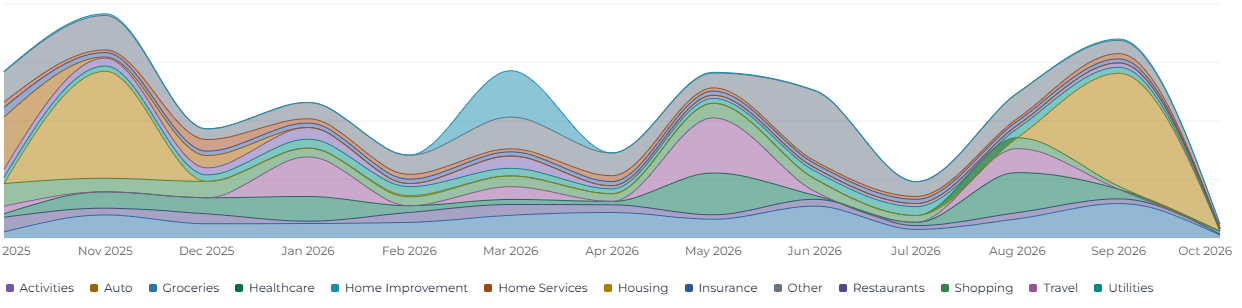
Figure 1: Typical month-over-month spending, life's needs makes it hard to budget
Click any point on the graph to see the transactions behind it. Switch to a category view, sort by amount, and in seconds you know exactly what drove a high-spend month, or what was missing from a month where you saved more than expected.
Fix the rules, not the transactions
Most finance tools make you recategorize transactions one at a time. Transaction Analyzer works differently. It builds rules that categorize transactions by description, merchant, and amount, and you edit the rules rather than the transactions. Fix a rule once and the change applies to your entire history and to every future transaction.
Review screens show you anything uncategorized or matched by conflicting rules, so nothing slips through. Adding explicit overrides for specific transactions is still possible, but that should be the exception rather than the normal case.
Own your data
Many banks let you download up to seven years of statements as PDFs, and Transaction Analyzer can import PDF statements from Wells Fargo and Chase directly. For other institutions, export CSVs of your transactions and load those in. If your bank's PDFs aren't supported yet, you can submit a sample statement and we'll add support.
You never hand over your bank login. You upload files, and that's it. The data is stored securely; encrypted at rest and in transit, protected by row-level access controls, and clearly partitioned and protected file storage.
Ask your own AI
You can connect your own AI model, such as Claude or ChatGPT, to your data using our APIs or MCP server. [One sentence on how: e.g. "via MCP, with access you can revoke at any time."] Good starting questions:
- "Summarize where my money is going."
- "Where could I cut back?"
- "How does my spending compare to a typical household?"
Your model can also help clean up your categories. Ask it to "consolidate my categories down to no more than 25" or "split groceries out from convenience stores," and it updates the rules, so your whole history and future transactions are recategorized in one step.
Start here
If you've been putting off understanding your spending, this is a good place to start. Give Transaction Analyzer a try and see what your money's been telling you.